 Flowo
Updated
What auto time blocking means
Auto time blocking is time blocking where the app chooses the slots. You give each task a duration and, if it has one, a deadline. The app places the task in free time around the events that cannot move, and places it again when the day changes. Manual time blocking is the same idea with the placing left to you: you drag each task to a time on a calendar and move it yourself when something runs long.
- Manual blocking, as Todoist and Sunsama describe it on their own pages, means dragging tasks to a day and time. Todoist adds a 30-minute duration by default when you drag an all-day task into a slot.
- Auto blocking, as Flowo does it, means the planner places every task from its duration, deadline and priority, around fixed events, meals, rest and sleep.
- The part that matters most is what happens after the plan breaks. In Flowo, the planner blocks the rest of today again from the current time, without being asked.
How Flowo blocks out a day
The steps below are what happens on a phone, from setup to the first slip of the day.
- Set the shape of the day. In My Day you set work hours, meals, rest and sleep. During setup you can also describe your week by voice or text, such as a client call on Thursdays and school pickup at 3:15.
- Add what cannot move. Appointments, calls and meetings go in as fixed events. The planner never moves them.
- Add tasks with rough durations. A guess such as 30 or 90 minutes is enough. Add a deadline if the task has one, and a priority if it matters more than the rest.
- Let the planner place the blocks. Meals, rest and sleep are placed first. Tasks then go into the free time before their deadlines, and a recurring block such as a habit is placed whole.
- Ask why. Open any block and choose Why here? to see what decided its place, such as a deadline, a category window or your productive hours.
- When a task runs over, the day is blocked again. Stretch the task's block, and the rest of the day makes room. Fixed events and pinned blocks stay put, every other task is placed again in order of deadline and priority, and Flowo shows what moved. Rebuilding the day is free, and the free plan includes 7 Recovery fixes a week for tasks that can no longer make their deadline.
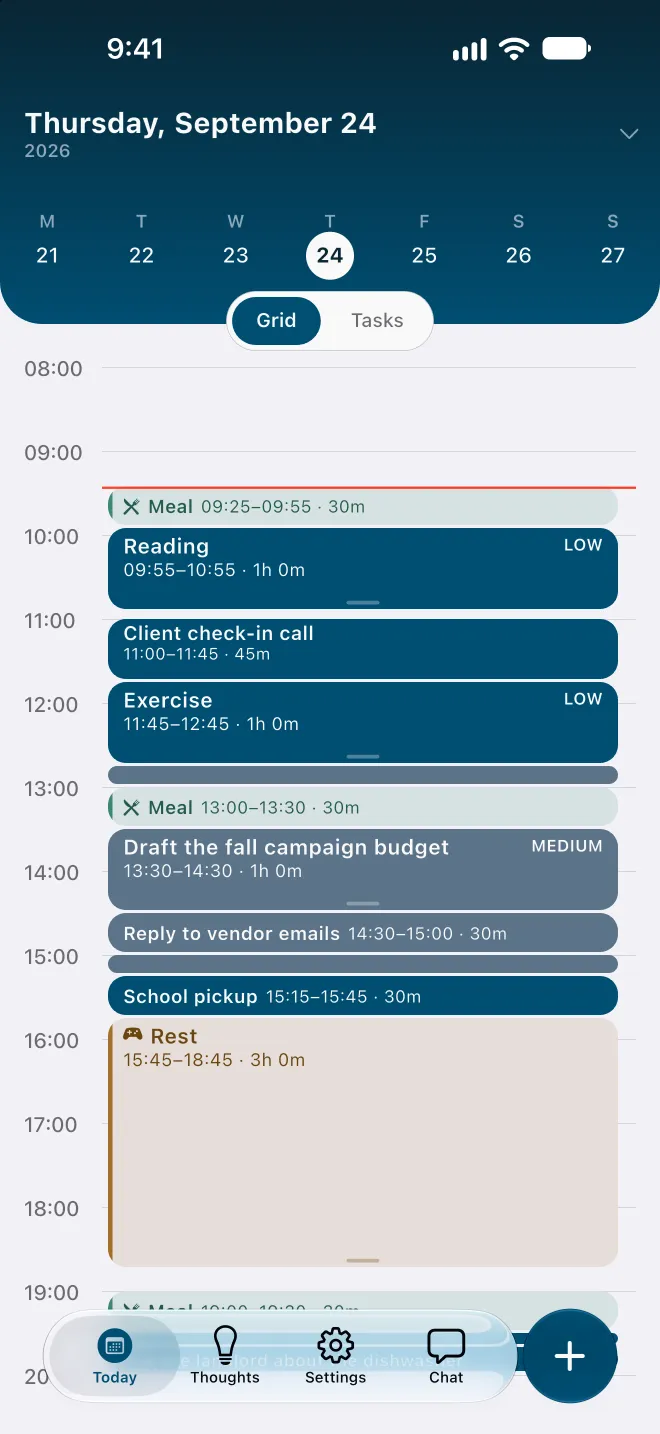
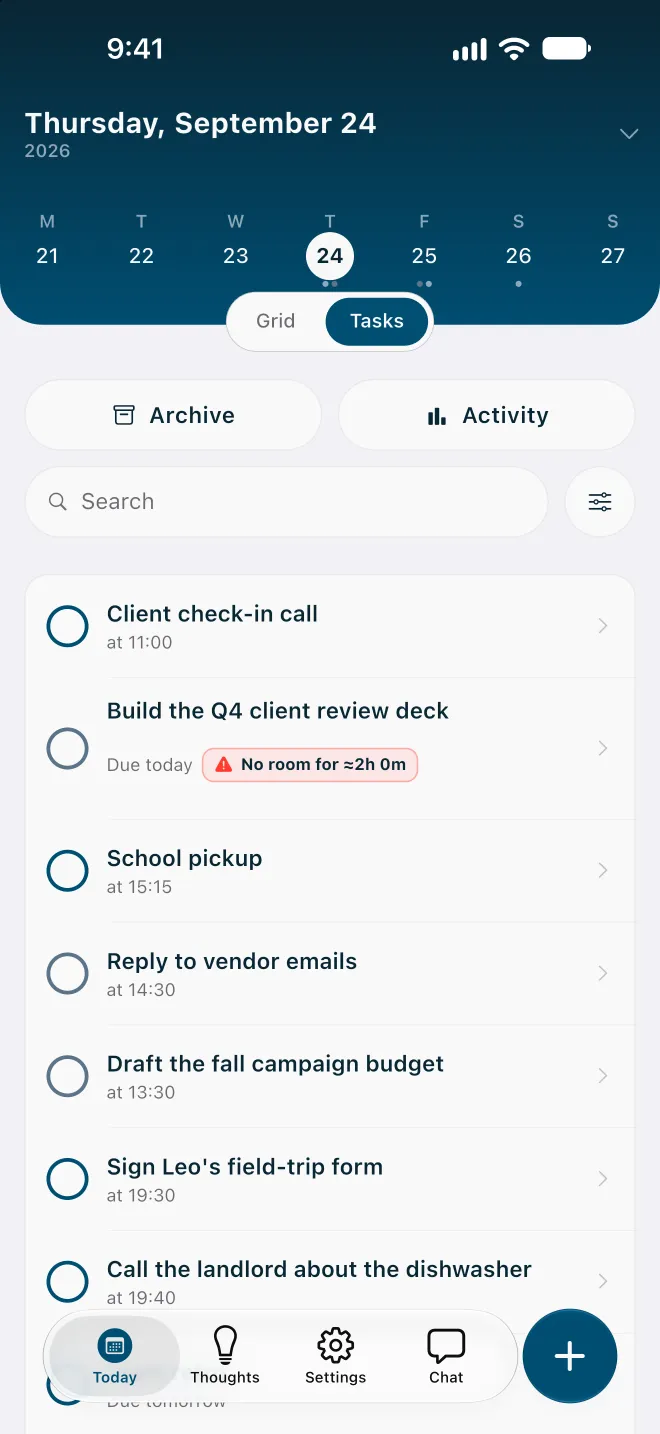
If a task can no longer fit before its deadline, it carries a No room badge with roughly how much time is missing, and the Resolve schedule sheet may offer to move the deadline. Nothing changes until you confirm. On an overfull day Flowo shortens rest first, then meals, and sleep last, never below the minimums set in My Day.
Blocking around your meetings
Flowo does not import Google, Outlook or iCloud calendars today. Meetings are added in Flowo as fixed events, and the planner blocks tasks into the gaps between them. For a week with a few regular calls, that takes a few minutes at setup. For a work calendar that other people book into all day, it is a real limit.
If your meetings live in a shared work calendar and you plan on a computer, a calendar-synced tool fits better. The pages comparing Flowo with Motion and Sunsama go through those cases. If your day lives on your phone, with appointments, pickups and calls you already know about, blocking around fixed events in Flowo covers it.
Why a blocked day shows problems early
Most people underestimate how long their own tasks will take, a pattern psychologists call the planning fallacy (Buehler et al., 1994). A to-do list hides the cost of that: seven tasks look the same whether they need three hours or nine. A blocked day turns the list into time, so an estimate that was too low pushes the tasks after it, and the overflow becomes visible.
Auto blocking moves that moment earlier. Because the planner places every task again when one runs long, the task that will not fit shows a No room badge at 10:50, not at 17:00. You still decide what gives way. The app only does the arithmetic of what still fits.
When manual time blocking is the better choice
- You like placing every block yourself. Dragging tasks onto a calendar is part of how some people think through a day. Todoist's help centre says "It's easiest to drag the task to the correct day and time", and that suits people who want that control.
- Your calendar belongs to other people too. Sunsama says it syncs both ways with Google, Outlook and iCloud calendars. Flowo cannot see those calendars today.
- You plan on a computer. Todoist and Sunsama both have desktop apps. Flowo is on iPhone and Android only.
- You want a routine that ends the workday on time. Sunsama's timeboxing page says a locked task "stays locked in place, with the rest of your tasks auto-adjusted to flow around it", inside a guided daily planning routine.
Flowo also lets you pin a block, so a task you placed on purpose stays where it is when the planner places everything else again.
Manual and automatic time blocking compared
| Todoist (its pages, 11 Nov 2026) | Sunsama (its pages, 11 Nov 2026) | Flowo | |
|---|---|---|---|
| Who picks the slot | You drag a task to a day and time | You drag each task to a time slot | The planner, from durations, deadlines and fixed events |
| Durations | Set by you, on Pro and Business | Set by you during planning | Set by you; a rough guess is enough |
| When a block runs over | You lengthen it by dragging its edge | Locked tasks stay and the rest flow around them | Places the rest of today again on its own and shows what moved |
| Calendars | Calendar integration | Two-way sync with Google, Outlook and iCloud | None; events are added in Flowo |
| Price of the feature | Calendar layout on Pro, US$7 a month or US$60 a year | US$22 a month, or US$17 a month billed yearly | In the free download; Flowo Pro removes weekly limits |
Trying auto time blocking
The quickest test is one ordinary day. Add tomorrow's fixed events, five or six tasks with rough durations and any deadlines, and look at where the planner puts them. When the first task runs long, stretch its block and see what moves.
Flowo is free to download on the App Store for iPhone and on Google Play for Android. Flowo Pro is an optional in-app purchase: US$4.99 a month or US$29.00 a year, both starting with a 14-day free trial that needs a payment method, or US$44.99 once with no trial. Your store shows the local price before you confirm.
The full mechanics are on the page about how Flowo re-plans when the day slips, and the methodology page lists the rules the planner follows and its known limits.
Questions
What is auto time blocking?
Auto time blocking is time blocking where the app chooses the slots. You give each task a duration and a deadline, and the app places it in free time around fixed events and places it again when the day changes.
Is there an app that time blocks my tasks automatically?
Yes. Flowo, on iPhone and Android, places tasks with durations and deadlines into the free time around fixed events, meals and sleep, and places them again when a task runs over. Motion schedules tasks around synced work calendars on a computer.
Does Flowo time block around my Google Calendar meetings?
Not today. Flowo does not import Google, Outlook or iCloud calendars, so meetings are added in Flowo as fixed events, and the planner blocks tasks around them.
Does Todoist do automatic time blocking?
Not on the pages we checked. Todoist's help centre describes dragging a task to a day and time, and a dragged all-day task gets a 30-minute duration by default.
Is auto time blocking free in Flowo?
Yes. Placing tasks into the day is part of the free download. The free plan includes 7 Recovery fixes and 5 Tidy Up runs a week, and Flowo Pro removes those limits.
Sources
- Todoist help: time blocking in Todoist, accessed 2026-11-11
- Todoist help: set a task duration, accessed 2026-11-11
- Todoist pricing, accessed 2026-11-11
- Sunsama timeboxing, accessed 2026-11-11
- Sunsama pricing, accessed 2026-11-11
- Sunsama daily planning, accessed 2026-11-11
- Buehler, R., Griffin, D., & Ross, M. (1994). Exploring the "planning fallacy". Journal of Personality and Social Psychology, 67, 366–381, accessed 2026-10-15