 Flowo
Updated
The short version
- Todoist keeps every task you have in projects, with due dates, reminders and filters. The free Beginner plan has 5 personal projects. Pro costs US$7 a month, or US$60 a year billed yearly, and adds the calendar layout, task durations, deadlines and custom reminders. You put each task on the calendar yourself.
- Flowo takes tasks with a duration, a deadline and a priority, places them around fixed events, meals and sleep, and rebuilds the rest of today when something runs long. It runs on iPhone and Android, is free to download, and Flowo Pro costs US$4.99 a month or US$29.00 a year.
- The difference in one line. Todoist tells you what is due. Flowo decides when in today each task happens, and decides again at 11:20 when the morning has already slipped.
When Todoist is the better choice
For a lot of people Todoist is the right tool, and switching would cost more than it saves. Each point below comes from Todoist's own pages.
- A long list across many areas of life. Pro allows 300 projects, and filters sort tasks across all of them. Flowo is built for the next day and the next week, not for a list of several hundred tasks that may never get a date.
- Work on a computer. Todoist runs in a browser and on computers as well as phones. Flowo has no desktop or web app.
- Connections to other tools. The pricing page lists more than 90 integrations, including email and calendar. Flowo connects to none of them today.
- Shared projects. The Business plan costs US$10 per member a month, or US$96 a year per member billed yearly, with up to 500 team projects. Flowo plans one person's day.
- Help from Todoist Assist. The pricing page lists Filter Assist on every plan, and Task Assist and Email Assist on Pro and Business.
- A system that already works. If your Todoist setup gets the important things done and only the odd day goes wrong, a second app is one more thing to keep up.
Where Flowo is different
The planner places the work. Todoist's help centre on time blocking says "It's easiest to drag the task to the correct day and time", and its duration guide says you place the task on your calendar when you plan your day. In Flowo a task goes in with a duration, a deadline and a priority, and the planner finds its place in the free time before the deadline. Why here? on any block shows what decided it.
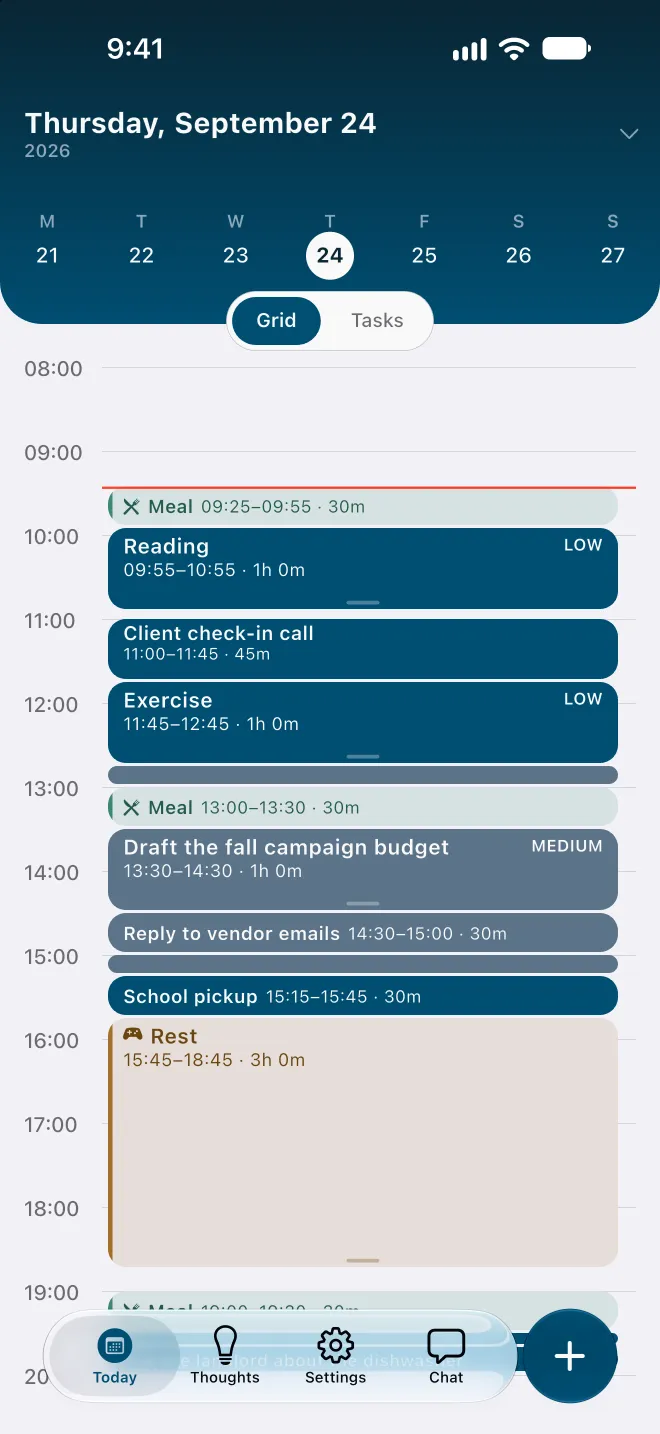
Re-planning inside today. Todoist's Today view has a Reschedule button for the Overdue section: you pick a new date for the overdue tasks, and the guide's advice is "Don't let overdue tasks build up from one day to the next." Flowo works on the hours that are left today. When a task runs over, it runs the planner again from now, on its own: fixed events and pinned blocks stay put, and every other task is placed again in order of deadline and priority. Rebuilding the day is free, and the free plan includes 7 Recovery fixes a week for tasks that can no longer make their deadline.
A warning before the day overflows. A Todoist list can hold more work than the day has hours, and nothing marks it until the tasks turn overdue. In Flowo a task that cannot fit before its deadline carries a No room badge with roughly how much time is missing, and the Resolve schedule sheet may offer to move the deadline. Nothing changes until you confirm.
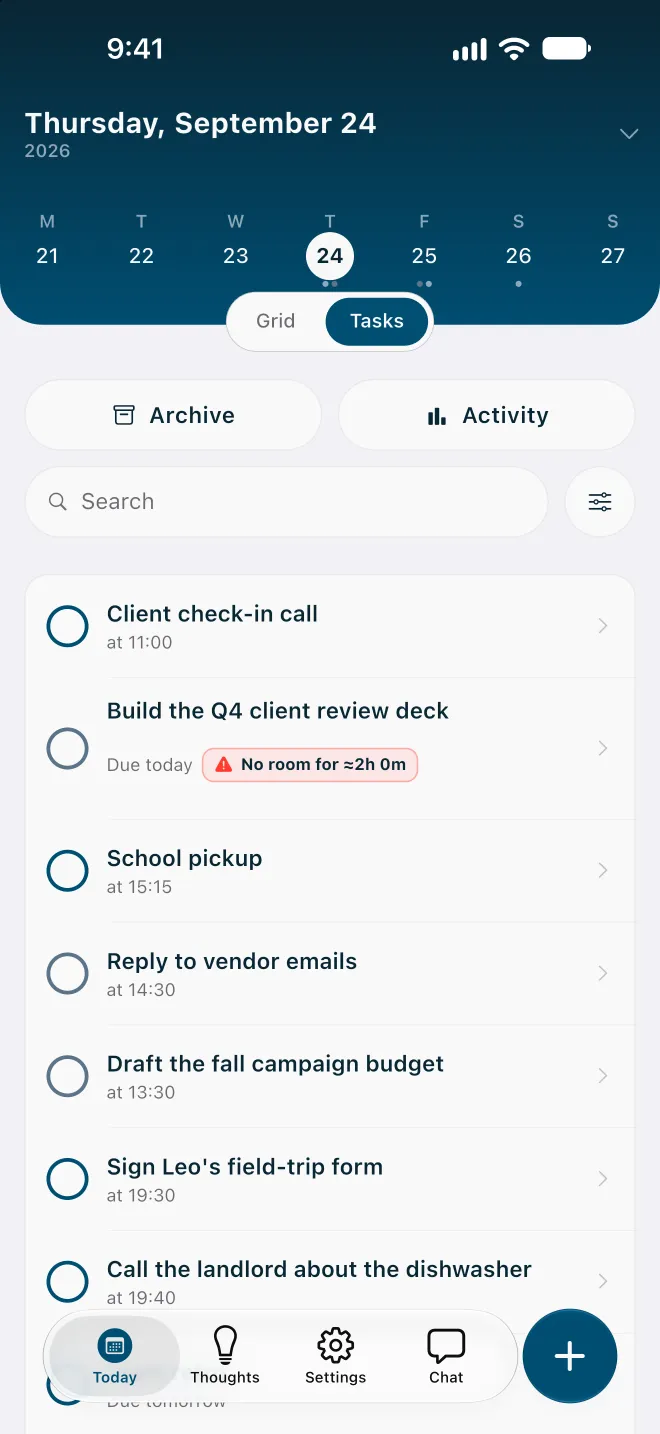
Meals, rest and sleep are part of the plan. They are placed before any task, and on an overfull day Flowo shortens rest first, then meals, and sleep last, never below the minimums set in My Day.
Scheduling in the free version. Todoist's calendar layout and task durations are Pro and Business features. In Flowo, placing tasks into the day is part of the free download; the weekly limits apply to Recovery and Tidy Up.
No account. Flowo needs no email login, and core planning records stay in encrypted local storage on the phone. Routine scheduling follows fixed rules on the device, so the same inputs give the same schedule.
One Tuesday in each app
Take a Tuesday with seven tasks, a dentist appointment fixed at 14:00, and a report due at 17:00. The first task of the morning, planned for 30 minutes, takes 50.
In Todoist, the seven tasks sit in the Today view with their due dates. On Pro, you drag them into the calendar layout to give each a time, and you can lengthen a block by dragging its edge. When the first task runs over, the blocks after it stay where you put them until you move them. Whatever is left in the evening shows as overdue, and Reschedule moves it to a date you choose.
In Flowo, stretching the first task by 20 minutes places the rest of the morning again around the 14:00 appointment. If the report no longer fits before 17:00, it carries a No room badge with the missing time. You see the problem at 10:50, while there is still time to drop something smaller or move a deadline.
Moving from Todoist, or using both
Flowo does not import tasks from Todoist today, so a move is done by hand. It goes faster than it sounds, because a timed day only needs the tasks that have a date.
- Start with the tasks due this week. Give each one a rough duration; a guess such as 30 or 90 minutes is enough, and you can change it later.
- Add the appointments and calls that cannot move as fixed events, so the planner works around them.
- Set work hours, meals, rest and sleep in My Day. The planner places these before any task.
- Leave the someday list where it is. Many people keep Todoist as the archive of everything and use Flowo for the next few days.
Notes that are not tasks yet can go into Brain Dump, in the Thoughts tab, and become tasks once they have a duration. The Brain Dump guide covers the details.
Side by side, as of November 2026
| Todoist (its pages, 11 Nov 2026) | Flowo | |
|---|---|---|
| Platforms | Browser, computers and phones | iPhone and Android |
| Free version | Beginner plan with 5 personal projects and task reminders | Free download with 7 Recovery fixes and 5 Tidy Up runs a week; notes have no limit |
| Price | Pro at US$7 a month or US$60 a year; Business at US$10 per member a month | Flowo Pro at US$4.99 a month, US$29.00 a year or US$44.99 once |
| How tasks get a time | You drag each task to a day and time; durations on Pro and Business | The planner places tasks from durations, deadlines and fixed events |
| Unfinished work | Shows as overdue; Reschedule moves it to a date you pick | Rebuilds the rest of today on its own and shows what moved |
| Connections | More than 90 integrations, including email and calendar | None; events and tasks are added in Flowo |
| Shared use | Business plan with team projects | One person's day |
Who should pick which
Todoist suits a long list that lives on every screen, with projects, filters and other tools feeding into it. Flowo suits a day that lives on a phone and changes after it is planned, where the useful answer at eleven in the morning is what still fits before five and what has to move.
Flowo is free to download on the App Store for iPhone and on Google Play for Android. Flowo Pro is an optional in-app purchase: US$4.99 a month or US$29.00 a year, both starting with a 14-day free trial that needs a payment method, or US$44.99 once with no trial. Your store shows the local price before you confirm.
The full mechanics are on the page about how Flowo re-plans when the day slips. A matching page compares Flowo with TickTick, and the planner comparison covers eight more apps.
Questions
Is Flowo a Todoist alternative?
Yes, for planning one person's day on iPhone or Android when the plan changes during the day. Todoist fits better for a long list of projects that you manage on a computer as well as a phone.
Is Todoist good for ADHD?
It depends on where the day goes wrong. Todoist is good at holding a long list on every device, but it does not place tasks into a timed day for you, so the work of fitting them into the hours stays with you.
Does Todoist schedule tasks automatically?
Not on the pages we checked. Todoist's help centre describes dragging a task to a day and time, and durations are set by you on the Pro and Business plans.
How much does Todoist cost?
Todoist's pricing page lists Beginner at US$0, Pro at US$7 a month or US$60 a year, and Business at US$10 per member a month or US$96 a year per member.
Can I import my Todoist tasks into Flowo?
Not today. Tasks are added in Flowo by hand, and only the ones with a date this week need to move for the planner to build a timed day.
Sources
- Todoist pricing, accessed 2026-11-11
- Todoist help: time blocking in Todoist, accessed 2026-11-11
- Todoist help: set a task duration, accessed 2026-11-11
- Todoist help: plan your day with the Today view, accessed 2026-11-11